

Robot Programming: The Four Types of Frames
Reference frames, sometimes called work objects or the origin, describe the position and orientation of objects, tools, and the robot itself. By attaching frames to different parts of the robotic system, you can indicate where objects are relative to one another.
Within each frame are six unique values, also called the six degrees of freedom. These are: 1) X distance, 2) Y distance, 3) Z distance, 4) X rotation, 5) Y rotation, and 6) X rotation.” Every time the object moves in the 3D space, these values change.
Understanding frames significantly simplifies the programming approach. Instead of calculating absolute coordinates, you can describe motion relative to the most convenient frame.
There are four primary types of frames you’ll work with: World, Tool, User, and Jog.
1. World Frame
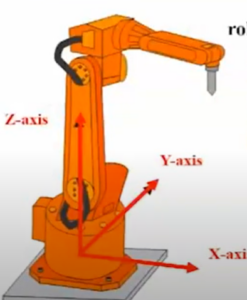
The World Frame, also called the Cartesian coordinate frame, is attached to the base of the robot and helps define comprehensive paths or safety boundaries, such as when a robot operates inside a protective cage. The World Frame is also considered a global reference, as it sets boundaries to ensure safety and precise control.
2. Tool Frame
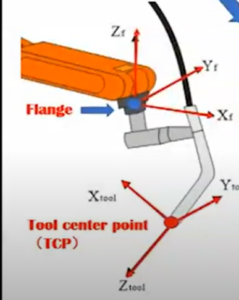
The Tool Frame is attached to the end-of-arm tooling and comes into play when you’re dealing with multiple tools on a robotic arm. The frame programs motions relative to the tool tip, not the robotic arm. Consider a grease application robot with two tools at its disposal: one for applying the grease and the other for camera inspection. By defining a unique frame for each tool, you can achieve seamless transitions and precision control over individual tasks.
3. User/Work Object Frame
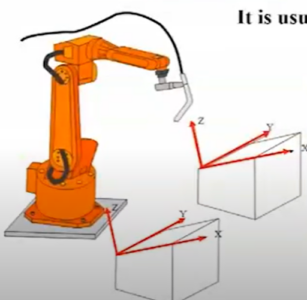
User-Defined, or Work Object Frames, accommodate work pieces. User Frames allow you to align the x, y, and z coordinate system around a fixture or workpiece that is translated and/or rotated with respect to the robot’s world frame. Defining a User Frame can considerably reduce programming efforts. For example, User Frames can move the robotic arm from point A to point B along the inclined edge of the object in Image 1.
4. Jog Frame
Jog Frames are not as commonly used as World, Tool, and User. They are temporary frames that allow you to manually position the robot from one point to another, and are usually employed during debugging or the initial commissioning of the robot.
Selecting the Right Frame
Not all frames are the same, and it’s important to understand the differences between permanent frames like World, User, and Tool, and temporary ones like Jog. Permanent frames, once established, streamline the programming and execution of robot moves, while temporary ones facilitate manual robot manipulation during setup and debugging.
Additionally, take the example of relocating the robot from one place to another. If every move in the robot were programmed in the World Frame, and the robot were relocated, every point would require adjustment. But if the robot were programmed in the Tool Frame, adjusting the frame would automatically adjust all the points.
As a general rule of thumb:
- World Frame: Establishes the basic boundaries within which the robot operates.
- Tool Frame: Moves the end-of-arm tooling.
- User/Work Object Frame: Moves the workpiece/part the robot is working on.
- Job Frame: Manually positioning during debugging or setup.
Do You Need Integration Assistance?
Founded in 1991, Patti Engineering is a consulting firm specializing in robotics, control systems integration, and Industry 4.0 digitization. We’re proud to be trusted by industry leaders like Siemens and FANUC. Our expert engineers can help you perform a robotic safety assessment, select the right robot for your application, and provide comprehensive integration assistance.
Visit our website to learn more about our capabilities or contact us today to schedule a project consultation.
FAQs
What Are Robotic Frames?
Frames are coordinates that a robot uses to understand where it needs to go, how its joints should be moved, and how it should interact with objects within its cell.
What Are the Primary Types of Frames?
World, Tool, User/Work Object, and Jog.
What Is the Difference Between Permanent and Temporary Frames?
Permanent frames, including World, Tool, and User/Work Object, are used throughout the robot’s lifecycle, while temporary frames, such as Jog, are used only during initial setup or when troubleshooting robot performance issues.
What Are the Use Cases for Each Frame?
World Frames are the primary reference point for the robot, located at the base, that helps the robot understand its boundaries within the robotic cell.
Tool Frames move the robot’s end-of-arm tooling.
User/Work Object Frames are associated with the part or workpiece the robot is interacting with.
Jog Frames allow users to manually position the robot during setup or when debugging.
How Do Frames Make Programming Easier?
Once you understand how frames work, you won’t need to calculate absolute coordinates for every point. So, in the case of a Tool Frame, you could tell the robot to “Move 10mm along the tool’s Z-axis,” and it would use the Tool Frame as the reference point. Additionally, if the robot is moved or repositioned, you can update one frame rather than every point in the program.
What Are the Six Degrees of Motion?
- X distance
- Y distance
- Z distance
- X rotation
- Y rotation
- Z rotation
These degrees of motion are values established within each frame.
Related categories: Blog Robotics